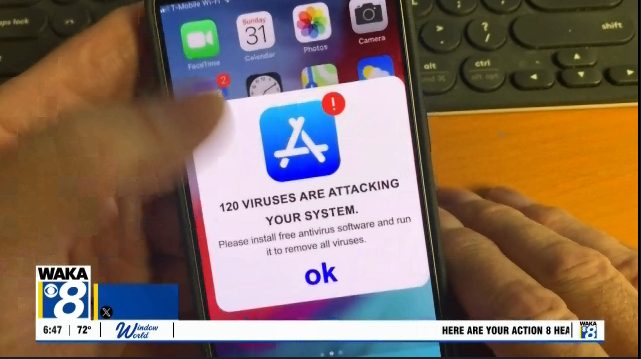
Residents across the country are seeing alarming pop‑up warnings on their smartphones that claim the device is infected with dozens of viruses. The messages look official—often mimicking Apple’s design—and urge users to download a free‑looking app called Total Cleaner. In reality, the alerts are a scam meant to frighten users into installing software that carries hidden costs and privacy risks.
How the Scam Works
The pop‑up appears while browsing and displays a list of alleged infections, sometimes as many as 120. It then prompts the user to tap a button to “clean” the phone. The page is actually an advertisement, not a legitimate security scan. A simple webpage cannot access a phone’s file system to detect malware, so the warning is purely a psychological trick.
Red Flags of the Total Cleaner App
If a user follows the prompt and checks the app’s listing, several warning signs appear:
- Fake reviews: The app shows hundreds of four‑ and five‑star ratings but only a couple of written comments.
- Hidden costs: Although advertised as free, the software charges $8 per month after installation.
- Privacy concerns: The app’s store details reveal that it collects personal data linked directly to the user’s identity.
These tactics are common in deceptive online ads, whether delivered through free apps, misleading websites, or ad networks. They do not provide any real protection and can expose users to further fraud.
Protecting Your Device
When you encounter a pop‑up warning, follow these steps:
- Close the tab immediately: Do not tap any buttons on the alert, even a “Cancel” or “Close” link. Instead, close the entire browser page or tab.
- Keep your operating system updated: Regular updates include security patches that protect against known vulnerabilities.
- Download only from official stores: Use the Apple App Store or Google Play Store for apps, and read reviews and permissions before installing.
Most modern smartphones are built with robust security features and do not require traditional antivirus programs. Staying vigilant, keeping software current, and avoiding unsolicited download prompts are the best defenses against these scams.
What to Do If You’ve Already Installed the App
If you have already installed Total Cleaner or a similar app, consider the following actions:
- Review the app’s subscription settings and cancel any ongoing charges.
- Uninstall the app from your device.
- Run a legitimate security check using a trusted app from a reputable developer, if you feel additional scanning is necessary.
Reporting the fraudulent ad to the app store and to consumer‑protection agencies can also help curb the spread of these scams.
Original reporting: Alabama News Network — read the source article.