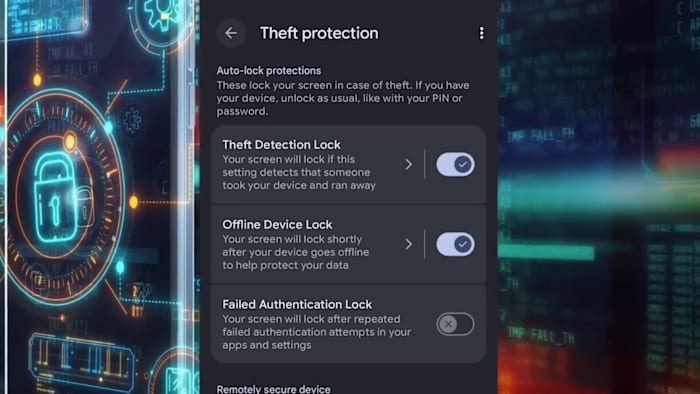
With families returning to back‑to‑school routines, keeping cell phones secure is more important than ever. A stolen phone can give thieves access to banking apps, social media, and personal identity information. Fortunately, most modern smartphones include built‑in safety tools that parents and students can activate in just a few steps.
Android (Google Pixel) Safety Settings
Pixel owners should open the Settings menu and look for the Theft Detection Lock. This feature uses motion sensors and artificial intelligence to recognize when the device is grabbed and moved quickly—whether the thief runs, rides a bike, or drives away. When the motion is detected, the screen locks instantly, preventing unauthorized use.
In the same security section, enable Offline Device Lock. If the phone loses its connection to the internet, the screen will lock shortly afterward, protecting data even when the device is out of range.
Another useful option is Failed Authentication Lock. After a set number of incorrect password or biometric attempts, the phone will automatically lock, thwarting brute‑force attempts to guess the passcode.
For lost or stolen devices, the Remote Lock feature lets you lock the phone from any computer or another device. Simply visit android.com/lock, enter your phone number, and the lock command is sent to the device.
iPhone Security Features
iPhone users can also protect their data through the Find My app. If the phone is stolen, you can place it in Lost Mode, which locks the screen, displays a custom message, and tracks the device’s location. Additionally, enabling a strong passcode and Face ID or Touch ID adds another layer of protection against unauthorized access.
Both platforms allow you to remotely erase all data if you determine the device cannot be recovered, ensuring that sensitive information never falls into the wrong hands.
Why These Steps Matter for Families
Back‑to‑school season means more teens and younger children are carrying phones throughout the day—on buses, in classrooms, and at after‑school activities. By configuring these security settings before the school year begins, families reduce the risk of identity theft, financial fraud, and the hassle of replacing a locked device.
Take a few minutes this weekend to review your phone’s security menu. The effort is small, but the peace of mind it provides for your household is priceless.
Original reporting: San Antonio, TX News (HLL/CB) — read the source article.