The Your
Nov 05, 2026
HyperLocal Loop
The Your

Close to home. Always in the loop.

Apple’s Live Listen feature explained: No hidden remote spying on iPhones

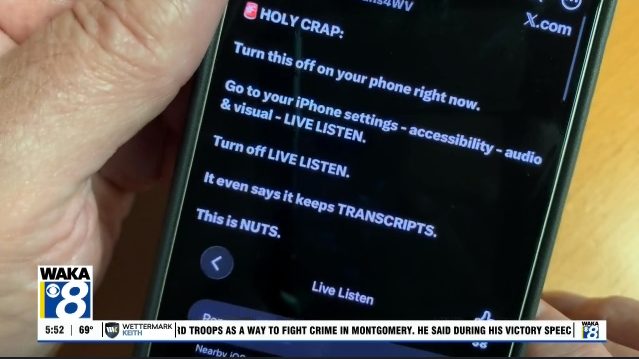
Recent posts on social media have warned that a new iPhone setting called “Remote Control” lets strangers monitor your phone. The claim is misleading. The setting is part of Apple’s Live Listen accessibility feature, which is designed to help people with hearing challenges.

What Live Listen does

Live Listen is found under Settings → Accessibility → Audio & Visual → Live Listen. When enabled, the iPhone acts as a microphone that streams sound to compatible AirPods or other hearing devices. It can help a user hear a conversation across a table or follow a speaker in a noisy environment. The feature also provides real‑time captions of the captured audio, but it does not record text messages, browsing history, or any other phone activity.

How “Remote Control” works

The “Remote Control” toggle simply allows a nearby device that shares your Apple ID—such as an Apple Watch, another iPhone, or an iPad—to start or stop a Live Listen session and view captions. This requires the devices to be signed into the same Apple account. Random strangers cannot activate the feature without access to an eligible device on that account.

Is there a risk?

If someone does have access to another device linked to your Apple ID, they could potentially start a listening session. That is a legitimate capability of the feature, but it is far from the claim that anyone can remotely monitor your phone. The toggle itself does not indicate an active listening session; it merely permits remote operation when an authorized device initiates it.

Should you disable it?

If you prefer not to allow any other device to control Live Listen, you can turn the feature off:

  • Open Settings
  • Tap Accessibility
  • Select Audio & Visual
  • Tap Live Listen
  • Toggle off Remote Control

Disabling the toggle does not affect other iPhone functions and simply removes the ability for another device on your account to start a Live Listen session.

Bottom line

The “Remote Control” setting is a legitimate part of an accessibility tool, not a backdoor for hackers. Understanding its purpose helps avoid unnecessary alarm and ensures the feature is used as intended to assist those who need it.


Original reporting: Alabama News Network — read the source article.

OBBM Network Editorial Staff

[email protected]

Editorial team behind OBBM Network — independent, hyper-local journalism syndicated through HyperLocalLoop and OBBM Network TV.

Leave a Reply

Your email address will not be published. Required fields are marked *

Recent News

Trending

Community News

Quick Start Deal

Turn Local Reach Into Real Leads

A monthly bundle that puts your business in front of local audiences across HyperLocal Loop and the OBBM Network — and delivers ready-to-contact buyers to your team.

$500 Per Month
What's Included
  • LeadEngine · 1,000 Contacts Verified, buyer-intent prospects in your market, delivered to your team
  • DataPulse · 1,000 Matches Identify and retarget anonymous visitors to your site
  • Banner Ads · 3 Cities Geo-targeted display placement across HyperLocal Loop in three cities
  • Video Commercial · 3 Cities Your commercial airs on the local OBBM channel in three cities
  • Audio · 10,000 Impressions Podcast ad impressions across the OBBM Network
  • Geo-Targeting City or regional targeting via AdServe
  • Real-Time Reporting Track campaign performance as it happens
Questions about any of this? Ask Ben →
Get Started
Secure checkout · Cancel anytime
Quick Start Deal

Get Loop-Ready in One Move

A low-commitment monthly bundle that keeps your business in front of local audiences across HyperLocal Loop and the OBBM Network.

$350 Per Month
What's Included
  • DataPulse · 1,000 Matches Identify and retarget anonymous visitors to your site
  • Banner Ads Geo-targeted display placement across HyperLocal Loop
  • Video Ad Airs on your Local OBBM Channel
  • Business Advertorial A featured sponsored article telling your story
Questions about any of this? Ask Ben →
Get Started
Secure checkout · Cancel anytime
§ 04 · Choose Your Package

Three levels. Up to 60% off.

Every Patriot Package is priced at over 40% off standard AdRevv list rates — and the discount deepens as you scale, up to 60% off at the Enterprise tier.

Tier I · Local
The Patriot
For local & regional brands launching with the network.
List Price: $835/mo
$500/mo
★ Save $335 — 40% Off
Monthly Allotment
  • Audio: 10,000Podcast impressions
  • Video: 10,000Streaming TV impressions
  • Banners: 50,000HyperLocal Loop geo-targeted banner impressions
  • DataPulse: First 1,000visitor matches included
  • City or regional geo-targeting via AdServe
  • Real-time campaign reporting
Start The Patriot
Tier III · National
The Enterprise
For national brands ready to dominate the network.
List Price: $5,065/mo
$2026/mo
★ Save $3,039 — 60% Off
Monthly Allotment
  • Audio: 14,000Podcast impressions
  • Video: 10,000Streaming TV impressions
  • Banners: 100,000HyperLocal Loop geo-targeted impressions
  • DataPulse: 5,000visitor matches included
  • LeadEngine: 20,000actionable buyer-intent contacts
  • Host Endorsements: 9podcast host-read spots
  • National geo-targeting + dedicated campaign manager
  • Priority creative production support
★ Bonus Included ★
Free 1-Year Freedom Chamber Membership
Faith, Family & Freedom business community at freedomchamber.net.
Start Enterprise

Need a custom configuration? Build your own package →